Signing in does not give you access to electronic resources.
Access is granted automatically to students and employees at UiO and OUS on the UiO network or via UiO user account.
Access vs. signing in
UiO students and employees
Note that you must have a user account in the library system to be able to sign in to Oria.
- Students who have registered for the semester and paid the semester fee automatically get a user account. (There is a delay of a few days due to transfer of data between systems.)
- Ph.d. students do not always get a user account automatically, and must in that case contact one of our libraries.
- Employees automatically get a user account. However externally financed fellows must contact one of our libraries to register.
How to sign in
- Go to Oria and click [Sign in] in the top right corner.
- Select [UiO students and employees].
- You will be asked to choose affiliation when you sign in with Feide from a new browser. Select University of Oslo and click [Continue].
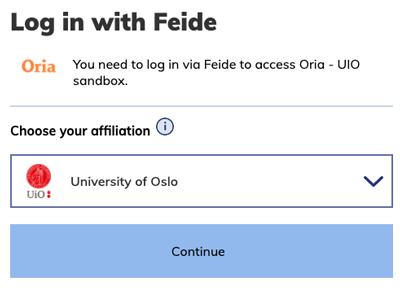
- Click the [Use work or school account] button and log in with username@uio.no and password.

- More information in the user guide for Feide with two-factor authentication.
OUS employees
Note that you need a user account in the library system to be able to sign in to Oria. OUS employees are not automatically registered. Please contact the library service desk at Rikshospitalet or Ullevål Hospital to register and get a library card. You will automatically receive sign-in information on e-mail.
How to sign in
- Go to Oria and click [Sign in] in the top right corner.
- Select [OUS employees and external users]
- Type in your username and password and click on [Sign in]. Your username can be found on the back of your library card, or on a sticker pasted on to the back of your hospital ID card.
Forgotten password
If you have forgotten your password you can order a new password here.
External users
You need a user account in our library system to be able to sign in to Oria. New users must visit the service desk at one of our libraries to register and get a library card. You will receive sign-in information by e-mail. Further information about the University Library's services to external users.
How to sign in
- Go to Oria and click [Sign in] in the top right corner.
- Select [OUS employees and external users]
- Type in your username and password and click on [Sign in]. Your username can be found on the back of your library card.
Forgotten password
If you have forgotten your password you can order a new password here.
Libraries
Public libraries, school libraries and foreign libraries can order interlibrary loan by signing in with their library number and password from BaseBibliotek.
How to sign in
- Go to Oria and click [Sign in] in the top right corner.
- Select Sign in for [Libraries]
- Type in your username, which is your library number from BaseBibliotek, and the corresponding password and click on [Logg inn].

Password and registration in BaseBibliotek
If you need a new password, use this form.
Is your library not registered, use this form.
For further help, please contact BaseBibliotek@nb.no.
Do you need help?
If you have followed the steps above but still can't sign in to Oria:
- Make sure that you are at the correct UiO Oria URL: https://uio.oria.no/.
- Delete your browser history or try another browser.
If you are still experiencing problems, please fill in the form for reporting problems with sign in or with your user account and we will help you.