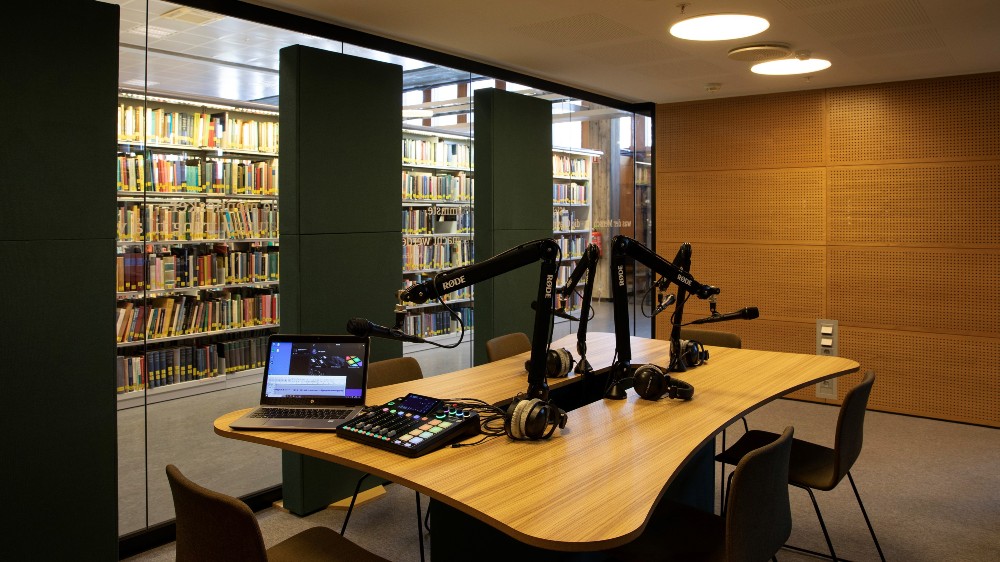
Where is the podcast studio
You can easily record your own programmes in the podcast studio in the Science Library in Vilhelm Bjerknes’ hus.
Who can use the studio
- All UiO students and staff can use the studio
- The studio is for non-commercial, scientific podcasts
- Podcasts must be UiO-affiliated and follow UiO’s publishing guidelines and normal journalistic standards
- You will get basic training before your first approved booking, so recording and file transfer work as they should
Booking the studio
- Book the room in TP at least one week in advance
- This gives the administrator time to arrange training and approvals
- You can book up to 4 hours at a time during the library’s staffed opening hours
In TP, choose location, room, week, date and a time slot of up to 4 hours. You can see available times in TP.
If you are not going to use your booking, please cancel it in TP so that others can book the room.
You borrow the key to the studio at the library desk by showing a valid UiO access card.
Before you record
- Decide what you want to record and prepare a script or notes
- Read about how the RØDE mixer and the editing software work before you go into the studio
- This makes your time in the studio more efficient and helps avoid technical problems
Recording – recommended method
The easiest and safest way to record is:
- Record onto the internal memory card in the RØDE mixer
- Use the Ø app on the laptop to copy the whole recording folder to the PC
- Use FileSender to send the files to yourself (or to the person who will edit)
The mixer is set up to record:
- one stereo track, and
- separate tracks for each microphone
This gives you more flexibility when editing. It is a good idea to transfer all these files after your session.
Other ways to record
- Connect an external hard drive to the mixer (see the mixer’s manual for details)
- Copy audio clips from the PC to the mixer via the Ø app and play them during the recording. In this way you can create a “finished” programme with little or no editing afterwards.
You may connect a phone to the mixer and call a guest during the recording. You can also use the PC for a video call and record the sound in the mixer, but we recommend that guests record their own sound locally and send the files afterwards for better audio quality.
Important: There is a memory card inside the mixer that stores both recordings and the mixer’s settings. Do not remove this card.
File transfer and storage
- Files on the mixer’s memory card and on the PC are deleted after some time
- Always remember to:
- use FileSender to upload the files to the person who will edit/publish, or
- save the recordings on your own hard drive or memory card
If the mixer’s memory card is full, you can delete recordings from it. If you are unsure how, check the mixer’s manual.
Automatic transcription
UiO offers a service that creates a transcript of your recording.
When you receive the transcript:
- listen through the audio
- note down the times of questions and parts you want to edit
- correct words or sentences where the automatic text is wrong
Publishing
UiO has a guide on how to publish a podcast. There is also an overview page with all podcasts from the University of Oslo.
The mixer
User guide for the mixer: RØDECaster Pro II | User Guide | RØDE (rode.com)
Food and drink
- Do not bring food into the studio
- Keep drinks well away from the equipment
- Use bottles or cups with lids to reduce the risk of spills
This helps the equipment last longer and keeps the studio in good condition.
Tips for better sound
Ventilation
- By the door there is a dial for the ventilation
- During recording: set it to no more than two dots to avoid fan noise
- In breaks and after recording: you can turn it up to about three dots
Microphone use
- Sit about 10 cm from the microphone
- Try not to move around too much while speaking
- Mute microphones that are not in use
- Adjust the microphone level so the meter on the mixer shows green from halfway and upwards. If it turns red, the sound will be distorted and may become unusable.
Headphones
- Turn down or mute headphones that are not in use
- If you are recording without phone calls or other external sources, guests do not need headphones
Please take care of the studio
- Do not unplug or rewire any equipment
- Do not remove anything, including the memory card in the mixer
- Do not move the table or sound-damping panels
Handle everything carefully so the studio works well for the next users.
Contact
For technical and production guidance, help with recording, editing and finishing your podcast, or to borrow a mobile recorder, contact Dag Backer well before your planned recording.
If there is any technical problem with the equipment, report it to Dag Backer.